Last updated:
Every software vendor publishes a page like this. Most of them pull the three nicest sentences out of their review profile and stop there. This one uses the whole profile, including the parts that are less flattering, because a rating you can verify is more useful than a rating you have to take on faith. Every figure below comes from the live Corfix listing on Capterra, and the link to check it is at the bottom. What follows is what 230 verified users in construction and field operations reported after putting the software on a jobsite.
How Corfix rates on Capterra
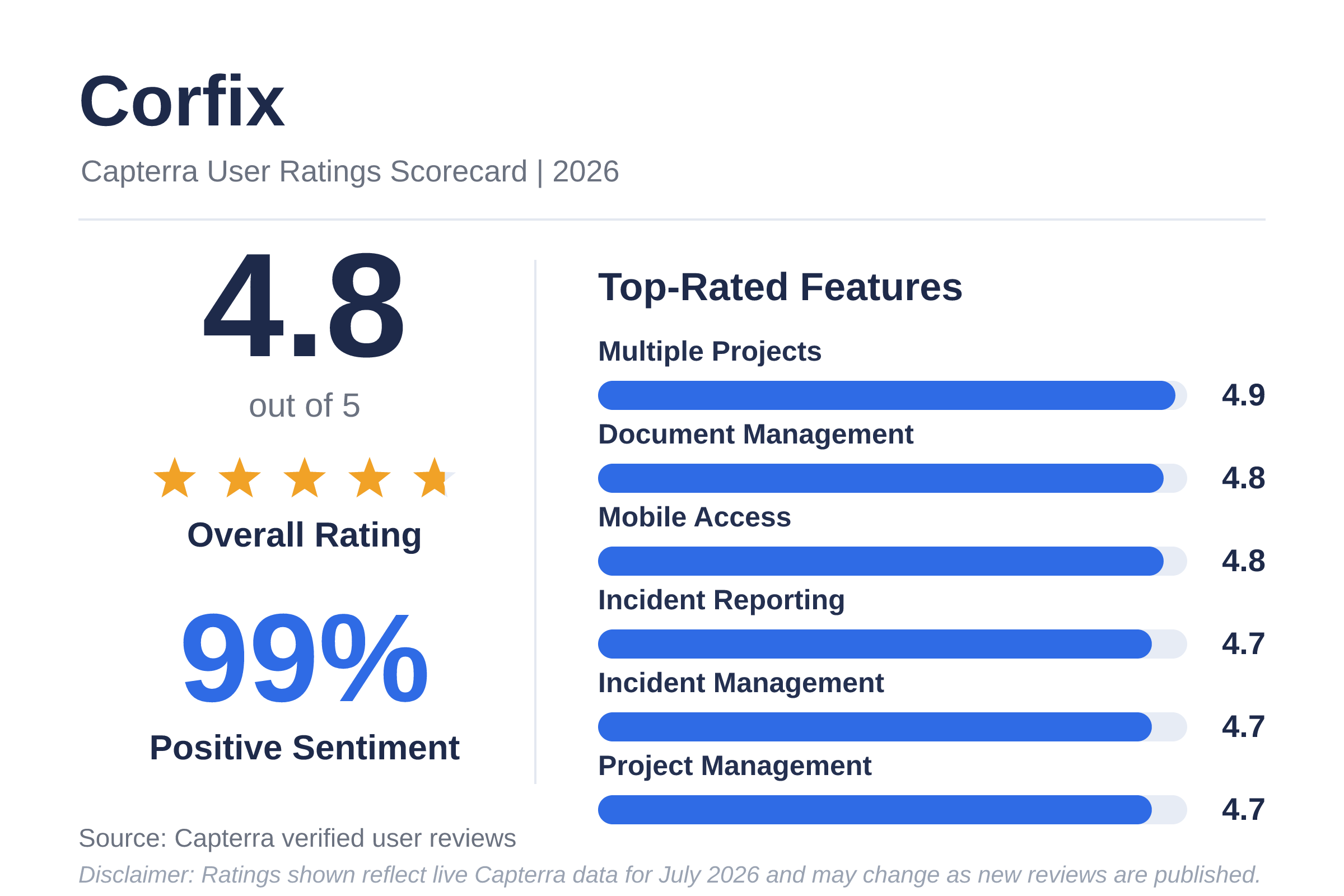
Corfix sits at 4.8 out of 5 across 230 verified reviews. The distribution tells you more than the average does: 187 reviewers gave five stars, 40 gave four, three gave three, and nobody has left a one or two star review.
Broken down by dimension:
- Customer service: 4.9 out of 5 (222 reviews)
- Ease of use: 4.8 out of 5 (230 reviews)
- Value for money: 4.8 out of 5 (207 reviews)
- Features: 4.7 out of 5 (230 reviews)
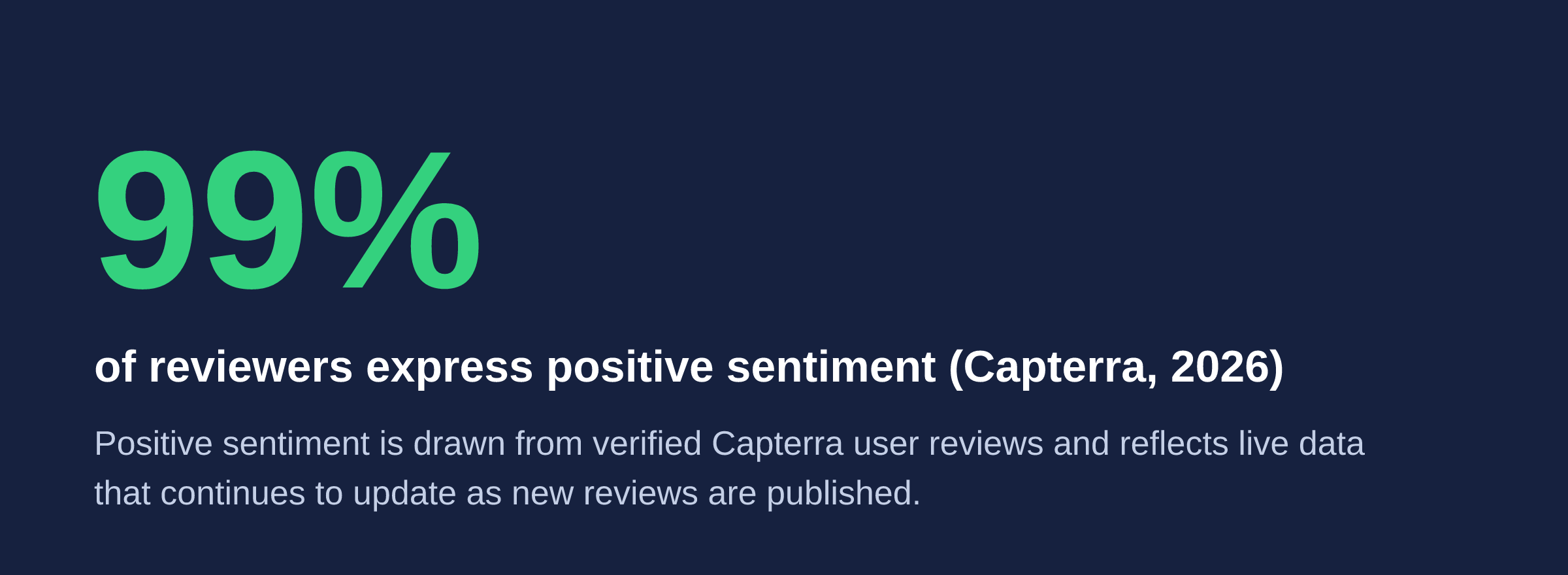
Capterra records review sentiment separately from star ratings. On the Corfix profile it currently reads 99% positive, 1% neutral, and 0% negative.
A note on how those reviews were collected, since it is visible to anyone who clicks through. Some of the recent reviews carry a Capterra disclosure indicating the reviewer was invited by Corfix and offered a nominal thank-you incentive in exchange for an honest review. That is a standard Capterra program. The reviews are still independently verified and moderated by Capterra, and reviewers are never told what to write. Read the profile and you will find four-star reviews and specific criticism sitting alongside the five-star ones.
Corfix is recognized on the 2026 Capterra Shortlist for construction management and holds the 2026 Best Ease of Use badge in the same category. Capterra Shortlist ranks the highest-rated and most popular products in a category using a blend of verified user ratings and search activity.
Which features reviewers rate highest
Capterra scores individual features only among reviewers who rated that feature, so the review counts differ from one line to the next.
- Multiple projects: 4.9 out of 5 (57 reviews)
- Document management: 4.8 out of 5 (121 reviews)
- Mobile access: 4.8 out of 5 (84 reviews)
- Project management: 4.7 out of 5 (45 reviews)
- Incident reporting: 4.7 out of 5 (101 reviews)
- Incident management: 4.7 out of 5 (66 reviews)
Capterra’s analysis of 4,090 construction management reviews found that project management, multiple projects, and document management are the three capabilities buyers in this category rate as most critical. Those are also three of the four features Corfix scores highest on.
Mobile access is the one that surfaces most often in the review text, usually tied to offline form completion. Crews working in dead zones can still fill out and submit forms, and the records sync when signal returns. For a lot of reviewers that determines whether the field uses the system or works around it.
What reviewers say Corfix fixes
Drawing on 157 reviews that describe the problems it solves, Capterra summarizes the pattern as paper-heavy safety and project workflows, missed form submissions, slow corrective-action follow-up, and weak communication between the field and the office.
Forms, certifications, inspections, time tracking, and job documents move into one mobile system, and the record exists the moment it is created rather than whenever someone remembers to bring the clipboard back to the trailer.
Kasey S., a COO in construction, wrote in June 2026 that onboarding and training new staff was straightforward, and that field crews responded well to a system that no longer relied on handwritten paperwork. Michael P., a field foreman, described his crew’s move off paper safety forms as smooth, and credited the Corfix support contact who resolved form issues during the same call.
For a longer look at how this plays out across a full audit cycle at a larger contractor, the Gillam Group webinar with Corporate Health and Safety Manager Brad Humenjuk covers how a company that nearly doubled in size handled COR audits and safety culture on the platform.
What reviewers switched from, and why
Recent reviewers name the platforms they left, which is more informative than a feature grid. Two reviewers in the first half of 2026 came from SiteDocs. One moved to gain field inspection forms and worker certification tracking. The other said their previous platform lacked the full functionality they needed.
An EHS and HR specialist in oil and energy consolidated off SafetyCulture and HSI, and reported paying less for Corfix than for the three previous tools combined. That reviewer also described an onboarding session in which 58 separate training forms were merged into one.
A COO who evaluated LMN alongside Corfix chose Corfix on the grounds that LMN carries elements of health and safety without a full compliance-form approach to safety management.
For a comparison built on features and pricing rather than reviewer anecdote, see our neutral roundup of the best construction safety software for contractors in 2026, or the individual Corfix comparison pages.
On Capterra’s own numbers, the surrounding category looks like this: SiteDocs sits at 4.8 across 255 reviews, SafetyCulture at 4.6 across 355, Workhub at 4.5 across 127, SafetyAmp at 4.7 across 48, and SafetyQube at 4.8 across 58. Corfix’s 4.8 places it at the top of that rating range on a mid-sized review base.
Who uses Corfix
Across 230 Capterra reviews, 80% of reviewers work at small businesses, 15% at midsize firms, and 5% at enterprises, meaning one in five comes from a midsize or larger organization. By industry, construction accounts for 83% and oil and energy for 3%. The remainder spans electrical and electronic manufacturing, renewables and environment, mechanical and industrial engineering, real estate, and management consulting, including one director who uses it for property and in-suite inspections rather than construction at all.
Corfix lists its target company size on Capterra as 2 to 10,000-plus employees, and larger organizations show up throughout the reviews. A health and safety supervisor at a contractor in the 201 to 500 employee range reported that completing safety forms, inspections, and reports digitally cut administrative time and reduced errors. One rollout documented in the reviews involved migrating more than 500 documents. Gillam Group implemented Corfix while nearly doubling in headcount.
By role, health and safety teams, project managers, and construction operations leaders use it most. Safety managers and coordinators run incident reporting, compliance tracking, and field documentation. Project teams log daily site activity. Owners, executives, and office administrators use it for oversight and reporting, and bookkeeping and payroll staff appear regularly in connection with time card data.
How the first half of 2026 compares to the category
Capterra compiled the 57 verified reviews published between January and June 2026 and benchmarked them against 180 category peer reviews across 43 products. Corfix rated above the construction management category average on every dimension measured in that window:
- Overall rating: 4.98, against a category average of 4.66
- Customer support: 5.0, against 4.67
- Value for money: 4.93, against 4.5
- Ease of use: 4.89, against 4.5
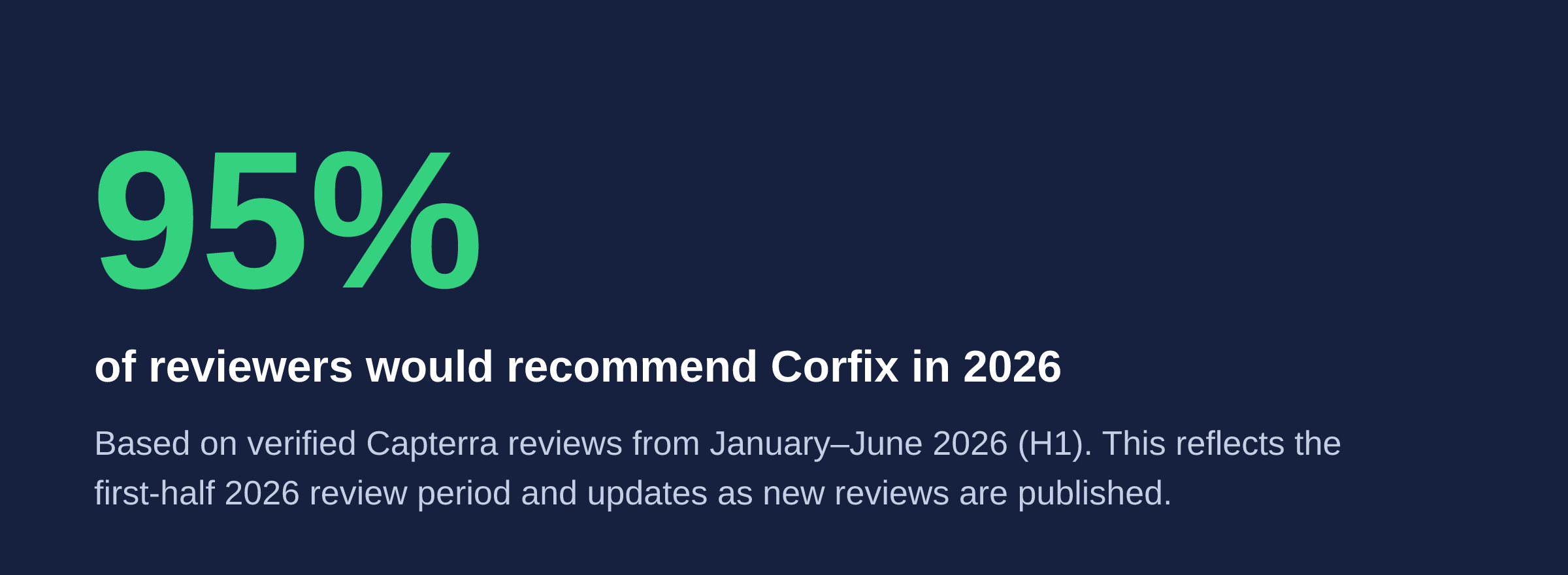
- Recommendation rate: 94.7%, against 91.7%
- Promoter score: +84, against a category average of +62
Ease of use was the dominant theme, raised in 56% of those 57 reviews, followed by customization at 37% and collaboration at 33%. All 57 reviews came from North America.
Fifty-seven reviews is a small sample, and the figures in this section are not visible on the public Capterra profile. See the methodology note at the bottom for where they come from.
Where reviewers want more
Three requests recur across the reviews. All three sit in configuration and administration rather than daily field use, which tracks with ease of use scoring 4.8 while features scores 4.7.
Permission configuration. Reviewers have described permissions and toggles as confusing to set up, and asked for more specific control over what individual roles can see and do. Both things are true at once, and the granularity is why. Corfix roles are assembled from individual access options switched on or off across the admin portal and the mobile app, which is what led one reviewer to move over from a platform that offered only all-or-nothing role assignment, and also why building a role from scratch takes some thought. Pre-populated roles ship with the platform for teams that would rather not start from zero.
Screening tasks in bulk. Kasey S., a COO in construction, wrote in June 2026 that the task module is the part her team likes least, not the concept but the ease of use, and that the initial view lacks a way to screen multiple tasks efficiently. Her suggestion was a layout closer to how completed forms are handled.
Notification filtering. Abdelhak S., a health and safety coordinator, wrote in April 2026 that the notification system alerts on every form submitted rather than filtering for urgent items. For a safety lead watching a high-volume site, that is the difference between a signal and a stream. Since that review, an update to form notifications added an AI-generated summary of each submitted form to the notification email itself, so a reviewer can judge from the inbox whether a form needs opening.
Frequently asked questions
What is Corfix rated on Capterra?
Corfix holds an overall rating of 4.8 out of 5 based on 230 verified reviews on Capterra. It scores 4.9 for customer service, 4.8 for ease of use, 4.8 for value for money, and 4.7 for features. Capterra records 99% of review sentiment as positive and 0% as negative. Corfix also holds 2026 Capterra Shortlist and Best Ease of Use recognition in construction management.
Are Corfix reviews on Capterra genuine?
Yes. Capterra independently verifies that reviewers are real people and moderates reviews for authenticity, including checks for plagiarism and AI-generated text. Some recent Corfix reviews carry a Capterra disclosure indicating the reviewer was invited by Corfix and offered a nominal incentive for an honest review. Reviewers are never told what to write, and the disclosure appears on the review itself.
What do Corfix users ask for most?
The most common requests in Capterra reviews concern configuration rather than daily field use. Reviewers ask for easier permission and role setup, a way to screen multiple tasks at once in the task module, and notification filtering that surfaces urgent items rather than alerting on every form submitted. Corfix roles are built from individual access options toggled on or off, and pre-populated roles are available as a starting point.
What software do Corfix users switch from?
Recent Capterra reviewers most often name SiteDocs, SafetyCulture, and HSI as the platforms they moved away from. Reasons given include wanting field inspection forms and worker certification tracking, needing broader functionality, and consolidating several separate tools into one system at lower combined cost. Some reviewers also evaluated LMN, Procore, and Fieldwire before choosing Corfix.
What size companies use Corfix?
Across 230 Capterra reviews, 80% of Corfix reviewers work at small businesses, 15% at midsize firms, and 5% at enterprises. By industry, 83% work in construction and 3% in oil and energy. Corfix is built for the whole crew, from field workers and supervisors through project managers, payroll staff, health and safety officers, and company owners.
Does Corfix work without an internet connection?
Yes. Corfix supports offline form completion, which reviewers repeatedly identify as one of its most valuable capabilities. Crews on sites without reliable cell signal can complete and submit forms, inspections, and documentation, and the records sync once a connection is available. Mobile access rates 4.8 out of 5 across 84 Capterra reviews that scored the feature.
The short version
Across 230 verified reviews, Corfix rates 4.8 out of 5, with its strongest marks going to customer service, document management, and mobile access. Reviewers span construction, oil and energy, and manufacturing, from small firms through enterprise, and the recurring requests cluster around setup and permissions rather than daily field use. Through the first half of 2026, Corfix tracked above the construction management category average on every dimension Capterra measured.
If your safety documentation is still living in binders and email threads, the fastest way to find out whether this fits is to watch it run against your own forms. Request a demo.
Methodology and sources
All-time figures in this post come from the live Corfix profile on Capterra, covering 230 verified reviews, with the profile last updated . Feature scores reflect only the reviewers who rated that specific feature, and review counts appear alongside each figure.
The first-half 2026 figures (recommendation rate, promoter score, category benchmarks, and rating themes) were compiled by Capterra from 57 verified reviews published between January and June 2026, benchmarked against 180 category peer reviews across 43 products in the construction management category. Capterra does not display this view on the public profile, so these figures come from the underlying review data rather than the live page.
Capterra review data updates continuously as new reviews are published, so every figure here reflects the date it was pulled and will drift over time. Some recent reviews on the Corfix profile carry a Capterra disclosure noting the reviewer was invited by Corfix and offered a nominal incentive in exchange for an honest review; those reviews remain independently verified and moderated by Capterra. Read the full set of reviews yourself on the Corfix profile on Capterra.